

We all send or receive messages on our phones. And we want them as least interruptive and annoying as they can be and at the same time, we also don’t want to miss some important messages from our office or work. Well, a feature from the Google application Messages called Bubble can be very important for you in this case. In this post, we’ll take a look at how you can enable and use the bubble feature in the Messages app.
Bubble Messages
This feature is available in several messaging applications like Messanger from Facebook, google messages applications and more. The feature is more convenient and makes it easy to eye on the important updates over messages. With the help of this feature, users can also interact with messages anytime while using any other application on their phone as it works as an overlay. Below is the preview of the Bubble feature.
The bubble message looks like the below image :
How to Enable Bubble Messages
To enable the bubble message on your Android phone follow these steps, this method is for the messages application from Google.
Open the messaging app. Click on the three dots and go to settings.

Now go to the Bubbles option. A page like below will appear.
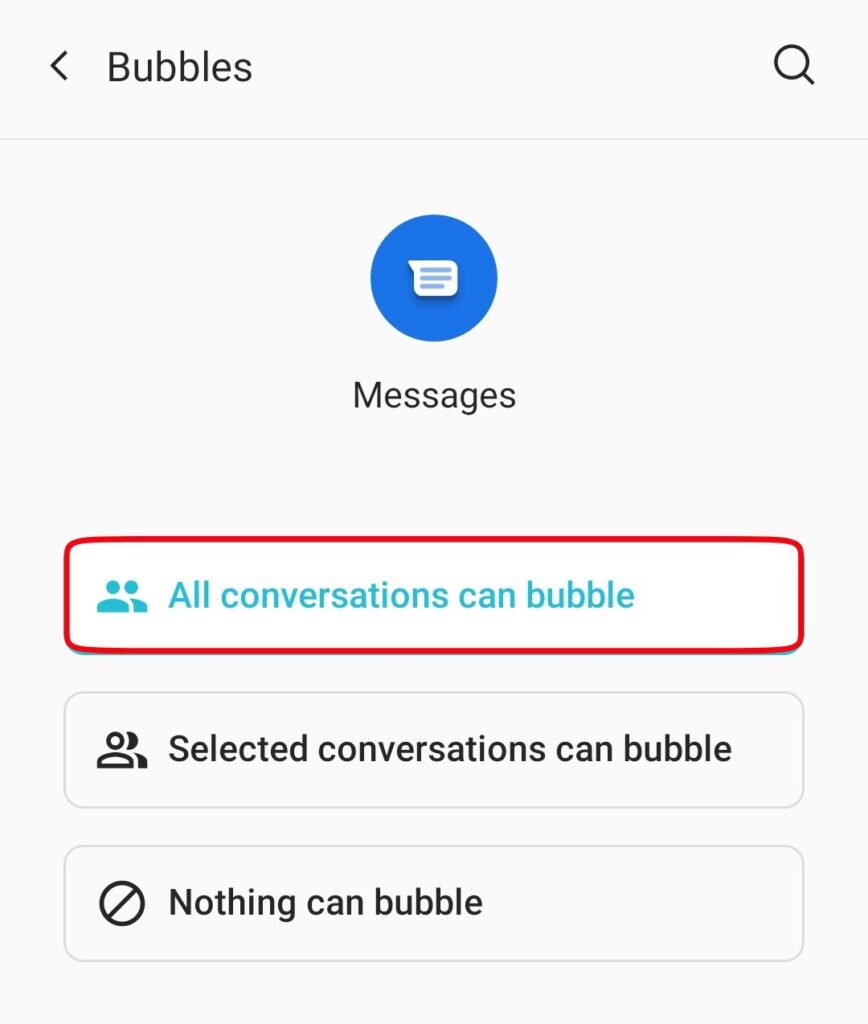
Now select it according to your requirements. Set it at “all conversations can bubble” to allow all messages to show in the bubble interface. Or set at “selected conversations can bubble” to make the bubble only for important messages.
How to Disable Bubble Messages
Open the messaging app. Click on the three dots and go to settings.
Now go to the Bubbles option. A page like below will appear.
Now select the last option “nothing can bubble” to make it off.

Leave a Reply